

SIMROOM: AV systems for simulation training and debriefing
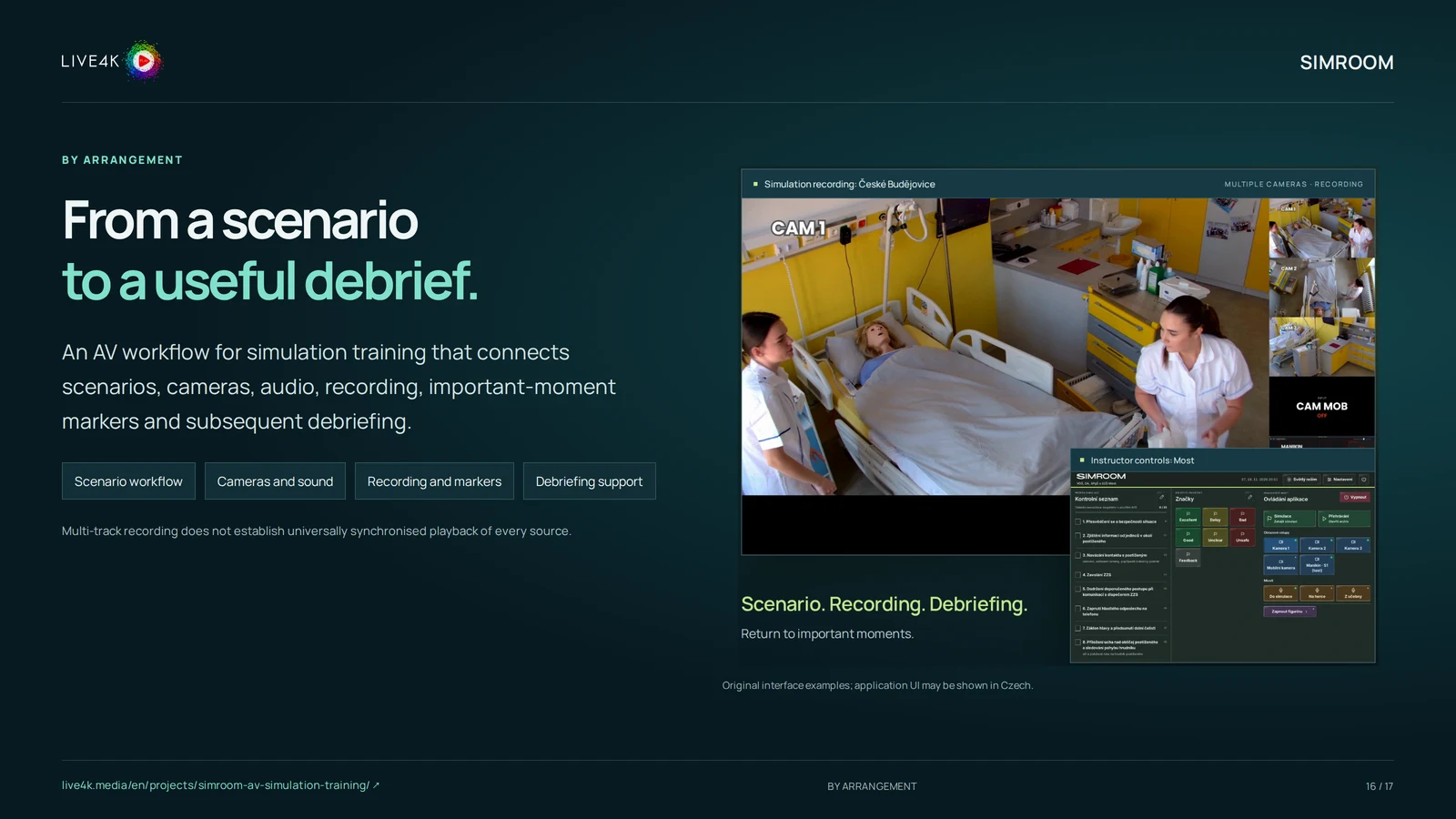
An AV workflow for simulation training that connects scenarios, cameras, audio, recording, important-moment markers and subsequent debriefing.
PURPOSE AND VALUE
SIMROOM: purpose and audience.
SIMROOM supports the path from a training scenario to a review of what happened. Cameras, sound and recording are connected with event markers so instructors can return to relevant moments during debriefing.
Important details can be missed when a simulation is reviewed only from memory. A prepared recording and marking workflow gives instructors a concrete basis for discussing participant actions and decisions.
Who it is for
- Simulation education centres
- Instructors and training programme owners
- Teams designing an AV environment for scenario-based learning
When it is useful
When a practical scenario needs to be recorded and reviewed in a structured teaching workflow.
Where it works
Simulation and teaching spaces with an agreed camera, audio, network and recording design.
CAPABILITIES
What the solution can do.
Scenario workflow
Prepare the AV setup around the teaching scenario and instructor needs.
Based on the project presentation; we will confirm the specific scope.Cameras and sound
Capture the agreed viewpoints and audio sources.
Based on the project presentation; we will confirm the specific scope.Recording and markers
Preserve the session and mark important moments for later review.
Based on the project presentation; we will confirm the specific scope.Debriefing support
Use the captured material as a basis for discussion after the simulation.
Based on the project presentation; we will confirm the specific scope.USE CASES
How it could help in practice.
Example situations the solution can support. We define the specific scope and expected value around your requirements.
Simulation instructors
Discuss a decision using the actual session
Mark the relevant moment and return to the captured material during debriefing.
Expected benefitA more concrete review conversation.
Education centres
Coordinate several observation sources
Design the room’s capture and review workflow around its scenarios.
Expected benefitA more usable technical teaching environment.
FROM INPUTS TO OUTCOMES
How it works.
SIMROOM supports the path from a training scenario to a review of what happened. Cameras, sound and recording are connected with event markers so instructors can return to relevant moments during debriefing.
- 01
Understand the teaching scenario
Agree what instructors need to observe and review.
- 02
Design the AV arrangement
Plan viewpoints, sound, controls and recording responsibilities.
- 03
Check a representative session
Verify capture and markers against the actual room and workflow.
- 04
Prepare debriefing and operation
Agree how recordings are reviewed, stored and managed.
Inputs, outputs and components
What goes in
Project brief
Training scenarios, room conditions and instructor requirements This input is needed for delivery.
Requirements and responsibilities
Agreed participant permissions, retention rules and authorised access This input is needed for delivery.
What comes out
Agreed outcome
An agreed AV capture and review workflow
As specified in the project agreement.
Handover
Recordings and event markers within the configured scope
As specified in the project agreement.
Components
Scenario workflow
Prepare the AV setup around the teaching scenario and instructor needs.
Cameras and sound
Capture the agreed viewpoints and audio sources.
Recording and markers
Preserve the session and mark important moments for later review.
Debriefing support
Use the captured material as a basis for discussion after the simulation.
CONNECTIONS AND FORMATS
How it fits your environment.
Room AV equipmentProposed connection
Check the actual camera, audio and control interfaces for the installation.
Connection requirements
- Confirm the actual interface, permissions and scope before implementation.
What needs a separate agreement
- Compatibility with every third-party system is not implied.
Teaching workflowProposed connection
Define recording access, marker use and the debriefing process with instructors.
Connection requirements
- Confirm the actual interface, permissions and scope before implementation.
What needs a separate agreement
- Compatibility with every third-party system is not implied.
PREPARATION AND HANDOVER
What we need to agree.
Start with a short conversation about your intended outcome, the existing environment and a useful first scope.
What we need from you
- Training scenarios, room conditions and instructor requirements
- Agreed participant permissions, retention rules and authorised access
Prerequisites
- Training scenarios, room conditions and instructor requirements
- Agreed participant permissions, retention rules and authorised access
What our team provides
- An agreed AV capture and review workflow
- Recordings and event markers within the configured scope
What we check at handover
- Review the agreed functions and deliverables against the project brief.
- Confirm relevant interfaces, responsibilities and limitations.
Engagement model and delivery scope
Ways to work together
- Project scope agreed individually.
Operating model
- Operating model and responsibilities agreed for the actual use case.
What affects the scope
- Multi-track recording does not establish universally synchronised playback of every source.
- Camera count, timing behaviour, controls and compatibility require installation-specific checks.
- Recording consent, access, storage and retention rules must be agreed by the organisation.
Questions for the first conversation
- What outcome should the project support?
- What environment and constraints apply?
- Who will review the result and manage its use?
Scope, availability and conditions
- Multi-track recording does not establish universally synchronised playback of every source.
- Camera count, timing behaviour, controls and compatibility require installation-specific checks.
- Recording consent, access, storage and retention rules must be agreed by the organisation.
What is not automatically included
- Multi-track recording does not establish universally synchronised playback of every source.
- Camera count, timing behaviour, controls and compatibility require installation-specific checks.
- Recording consent, access, storage and retention rules must be agreed by the organisation.
FREQUENTLY ASKED QUESTIONS
Questions you may have.
Does multi-track recording guarantee all views play in perfect sync?
No general guarantee is made. Timing and playback behaviour must be tested for the actual setup.
Can this be adapted to our teaching room?
We start with the room, scenarios and instructors’ needs, then assess the equipment and workflow required.
LET’S TALK
Let’s discuss working together.
Choose a time for a short call. We will start with this project and discuss your needs, constraints and next steps.
We will agree the specific scope and delivery options around your requirements.
The call booking form is loading. If it does not load, email us or call +420 773 749 040.