

Forge: AI-assisted parametric 3D design
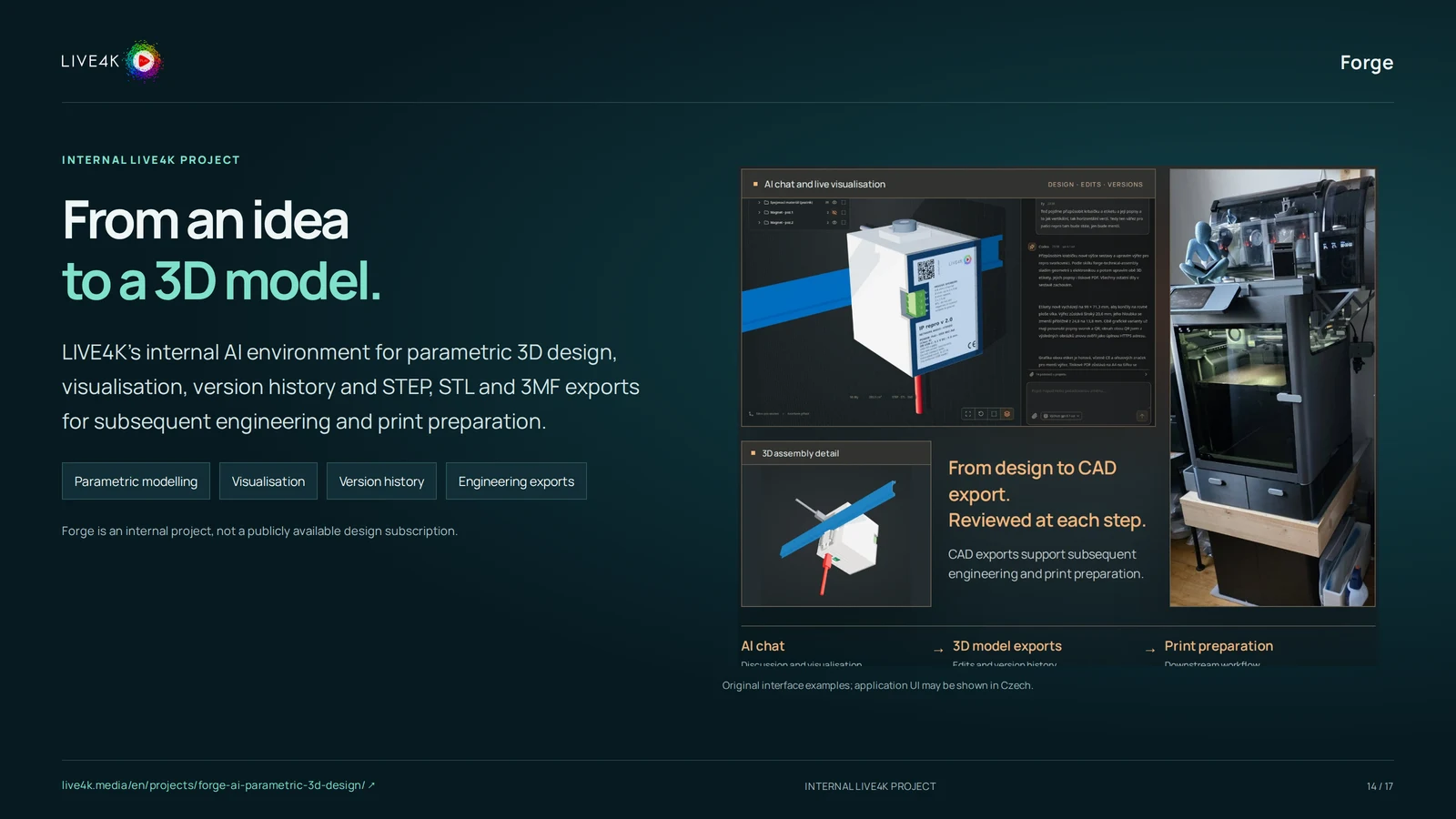
LIVE4K’s internal AI environment for parametric 3D design, visualisation, version history and STEP, STL and 3MF exports for subsequent engineering and print preparation.
This is an internal LIVE4K project and an example of our experience. Any use for your business needs a separate agreement.
PURPOSE AND VALUE
Forge: purpose and audience.
Forge explores an AI-assisted route to parametric CAD models. It brings model preparation, visualisation, variant history and engineering exports into one internal design environment.
Moving between a design idea, its geometry and the next revision can create repeated manual work. A shared history and export workflow help make design iteration more organised.
Who it is for
- Teams exploring AI-assisted engineering workflows
- Designers assessing parametric modelling and variants
- Businesses connecting software with prototyping
When it is useful
When you want to assess AI assistance for a bounded modelling task or the handover from design to manufacturing preparation.
Where it works
An internal LIVE4K environment. Any external access or customer deployment needs a separate agreement.
CAPABILITIES
What the solution can do.
Parametric modelling
Work with model parameters and editable design variations.
Based on the project presentation; we will confirm the specific scope.Visualisation
Review the proposed geometry in the design environment.
Based on the project presentation; we will confirm the specific scope.Version history
Keep track of variants and changes during iteration.
Based on the project presentation; we will confirm the specific scope.Engineering exports
Prepare STEP, STL and 3MF files for the next engineering or print-preparation step.
Based on the project presentation; we will confirm the specific scope.USE CASES
How it could help in practice.
Example situations the solution can support. We define the specific scope and expected value around your requirements.
Prototyping teams
Explore several geometric variants
Use parameters and version history to compare a bounded design.
Expected benefitA clearer design review process.
Engineering teams
Prepare a model for another tool
Export and validate the agreed file format before further work.
Expected benefitA more explicit handover between design stages.
FROM INPUTS TO OUTCOMES
How it works.
Forge explores an AI-assisted route to parametric CAD models. It brings model preparation, visualisation, variant history and engineering exports into one internal design environment.
- 01
Define a modelling task
Agree the geometry, parameters and intended use.
- 02
Prepare and inspect a model
Review the generated or edited design rather than assuming it is correct.
- 03
Refine a variant
Adjust parameters and compare the resulting versions.
- 04
Export for the next tool
Check the required file format and downstream engineering work.
Inputs, outputs and components
What goes in
Project brief
A bounded design brief, dimensions and intended output This input is needed for delivery.
Requirements and responsibilities
A qualified reviewer for geometry and manufacturing requirements This input is needed for delivery.
What comes out
Agreed outcome
Reviewed design variants within the internal or agreed pilot scope
As specified in the project agreement.
Handover
STEP, STL or 3MF files for downstream preparation
As specified in the project agreement.
Components
Parametric modelling
Work with model parameters and editable design variations.
Visualisation
Review the proposed geometry in the design environment.
Version history
Keep track of variants and changes during iteration.
Engineering exports
Prepare STEP, STL and 3MF files for the next engineering or print-preparation step.
CONNECTIONS AND FORMATS
How it fits your environment.
CAD and print-preparation toolsProposed connection
Use exported files in a compatible downstream tool and check the resulting model there.
Connection requirements
- Confirm the actual interface, permissions and scope before implementation.
What needs a separate agreement
- Compatibility with every third-party system is not implied.
PREPARATION AND HANDOVER
What we need to agree.
Start with a short conversation about your intended outcome, the existing environment and a useful first scope.
What we need from you
- A bounded design brief, dimensions and intended output
- A qualified reviewer for geometry and manufacturing requirements
Prerequisites
- A bounded design brief, dimensions and intended output
- A qualified reviewer for geometry and manufacturing requirements
What our team provides
- Reviewed design variants within the internal or agreed pilot scope
- STEP, STL or 3MF files for downstream preparation
What we check at handover
- Review the agreed functions and deliverables against the project brief.
- Confirm relevant interfaces, responsibilities and limitations.
Engagement model and delivery scope
Ways to work together
- A separately scoped discussion or evaluation; access is not implied.
Operating model
- Operating model and responsibilities agreed for the actual use case.
What affects the scope
- Forge is an internal project, not a publicly available design subscription.
- Documentation supports CAD, versions and exports; it does not establish a live connection to a physical printer.
- Exported geometry needs qualified engineering and manufacturing checks.
Questions for the first conversation
- What outcome should the project support?
- What environment and constraints apply?
- Who will review the result and manage its use?
Scope, availability and conditions
- Forge is an internal project, not a publicly available design subscription.
- Documentation supports CAD, versions and exports; it does not establish a live connection to a physical printer.
- Exported geometry needs qualified engineering and manufacturing checks.
What is not automatically included
- Forge is an internal project, not a publicly available design subscription.
- Documentation supports CAD, versions and exports; it does not establish a live connection to a physical printer.
- Exported geometry needs qualified engineering and manufacturing checks.
FREQUENTLY ASKED QUESTIONS
Questions you may have.
Does Forge directly operate a 3D printer?
That is not established by the reviewed documentation. The documented scope includes CAD, version history and exports for later preparation.
Are exported models ready for manufacturing?
They require the engineering, tolerancing and manufacturing checks appropriate to the intended use.
LET’S TALK
Let’s discuss working together.
Choose a time for a short call. We will start with this project and discuss your needs, constraints and next steps.
This is an internal LIVE4K project and an example of our experience. Any use for your business needs a separate agreement.
The call booking form is loading. If it does not load, email us or call +420 773 749 040.